Solenki brings your solar production and utility usage together, giving you clear insights, real savings, and a brighter tomorrow.
Connect to Solenki™
Securely connect your energy accounts.
Utility connectedSolar platform connected
Data connections
H
BC Hydro
Utility usage
Electricity use, cost and billing data.
Not connected
✉
▣
▣ Your credentials are used securely and are never stored.
●
APsystems
Solar production
Production from your connected solar hardware.
Not connected
♙
▣
▣ Your credentials are used securely and are never stored.
Enter both provider usernames and passwords to continue.
!
Sign-in failed
i
New to Solenki?
Contact your solar provider for access or support.
My SOLENKI
Profile & Solar Systems
Organize each property into buildings or locations, then place one or more solar systems under each. Property totals can combine every building and connected solar system.
S
Optional. Stored with your SOLENKI profile.
Loading your properties and solar systems…
!
SOLENKI notification
Utility Rate Settings
View, verify or adjust the rates Solenki uses for your calculations.
Utility rate settings
Published rates
These are the electricity rates Solenki uses to estimate what you pay BC Hydro and the value BC Hydro pays for solar you send to the grid.
Purchase plan
Residential Tiered
Standard time pricing
What you pay BC Hydro
Tier 1:11.87¢/Tier 2:14.08¢/kWh
Tier 2 starts after 22.1918 kWh/day × the number of days in your billing period. Basic charge: 23.44¢/day.
What BC Hydro pays you
$0.1000/kWh
RS 2289 Self-Generation
Rate verification
BC Hydro published rates
Not checked yet
New BC Hydro rates are available.
Rate history
Each effective rate set is stored against this site so historical dollar calculations keep the rate that applied at the time.
Effective
Purchase rate
Export rate
Source
Leave the default unless this customer is confirmed as a legacy RS 1289 account.
Actual dollar rate used for financial history, for example $0.1000/kWh.
Turn this on only when this customer is actually enrolled in BC Hydro time-of-day pricing. Leave it off for normal tiered or flat residential pricing.
Solenki checks BC Hydro's published residential purchase rates and self-generation export rate automatically about once every 7 days. Automatic checks never overwrite your values. If a change is detected, Solenki asks you to review and apply it. Fixed basic charges are shown for reference but are not counted as solar savings because rooftop solar does not remove the fixed daily charge.
SOLENKI™ Web App
Install SOLENKI™
Add SOLENKI to your Home Screen for the full app-style experience.
to
Choose report period
Choose the dates Solenki should show.
BC Hydro Billing Cycle
Saved permanently for this customer/site and available to reports.
These dates are stored in PostgreSQL against this site. Saved cycles remain available after logout, restart and deployment, and can be selected from Billing cycle reports.
Saved billing cycles
Showing: Last 3 months
●Showing: Last 3 months
Live daylight
Sunrise
Solar noon
Sunset
Your solar impact
Energy working for your home
Production, household use and financial value for the selected period.
Solar value created$0.00
Estimated bill savings plus the value of solar sent to BC Hydro for the selected period.
☀
Solar produced
—
Matched production for this period
EMA history total: —
⌂
Your home’s electricity
Where your home power came from
—From solar ——
—From grid —
Total electricity used by your home for this period.
Electricity cost covered by solar
—%
Direct solar savings plus export credits.
Days included—Both sources available
☀
Your solar production
Where your solar energy went
—Used by home —
—Sent to grid ——
Total solar produced for this period.
Live conditions
Your solar homeSolar site location
Live weather outlook
Detailed hourly forecast
Current and upcoming conditions for this solar site.
Weather outlook will load with the dashboard.
Your energy story
Energy & money at a glance
A high-level view of what your solar produced, where the energy went and the financial value.
Energy
Money
Connect both data sources to see your solar value story.
Selected-period result
Your solar value outcome
$0.00
Total value created from avoided electricity purchases plus BC Hydro export credits.
Solar produced
—
Used at home
—
—
Sent to Hydro
—
—
Cost comparison
With solar vs. without solar
Estimated energy cost without solar
$0.00
Estimated grid energy cost with solar
$0.00
0% lower estimated energy cost with solar for the selected matched period. Fixed basic charges and taxes are not shown as solar savings.
💲
Saved on electricity
$0.00
Estimated value of solar your home used instead of purchasing that electricity.
💰
BC Hydro credit value
$0.00
Extra solar sent to BC Hydro, valued at the current self-generation rate.
🛒
Electricity purchased
$0.00
Estimated energy charge for electricity still purchased from BC Hydro.
⌂
Electricity used by your home
—
Solar used directly plus electricity purchased from BC Hydro.
Your environmental impact
Clean energy with a measurable impact
See the environmental value created by the solar energy produced during the selected period.
Clean solar generated
—
Estimated emissions avoided
—
Tree-growing equivalent
—
Environmental estimates use British Columbia's 2026 electricity consumption emissions intensity of 18 g CO₂e/kWh. The tree comparison is an approximate communication equivalent based on the U.S. EPA's urban tree-seedling methodology (about 60 kg CO₂ sequestered per tree over 10 years). It does not mean trees were literally planted or saved.
Your solar performance
Energy and financial performance — year to date
A single view of the value your solar is creating, the BC Hydro energy cost that remains, and how your home is being powered.
Solar savingsBC Hydro energy costCumulative solar value
Dollar scale is shown on the left. Hover a monthly bar or gold trend point for the exact value.
Energy flow for selected period
How your home was powered
Solar used at home, grid energy used, and extra solar sent to BC Hydro.
0%powered by solar
Solar used at home——
Grid energy used—
Energy sent to grid——
Your home used total—
Your solar made total—
Data comparison
BC Hydro vs. Solenki — Daily Energy Comparison
Stored BC Hydro meter data is compared with the daily values Solenki calculates from that data. Differences highlight any variation introduced by processing, normalization or later calculations.
BC Hydro — Grid Energy UsedSolenki — Calculated Grid Energy UsedBC Hydro — Energy Sent to GridSolenki — Calculated Energy Sent to Grid
Seasonal performance
How your solar performs through the seasons
Each season has its own chart so you can see how production changes through winter, spring, summer and fall. The charts use all available Solenki history from the date your system first generated power.
❄️Winter
December • January • February
🌱Spring
March • April • May
☀️Summer
June • July • August
🍂Fall
September • October • November
Reports
Energy & Solar Reports
Choose a report tab below. Your selected date period continues to apply across every report.
Financial report
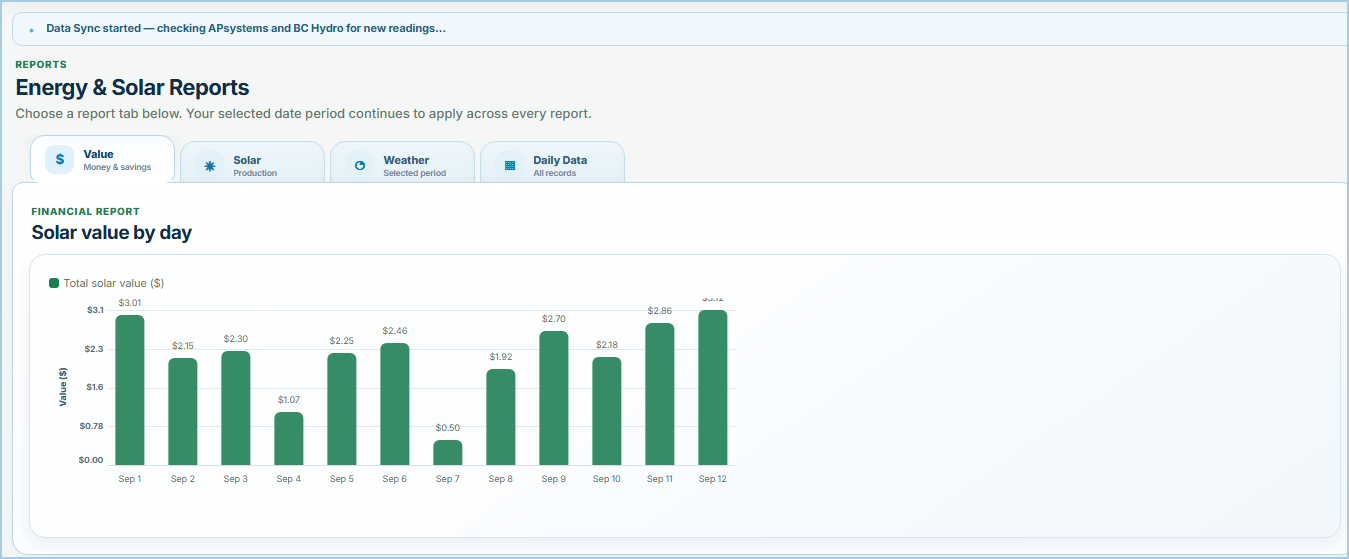
Solar value by day
Total solar value ($)
Production report
Solar production
Solar production by day
Solar production (kWh)
Solar production & sunshine
Compare daily solar output with recorded sunshine hours.
Solar kWhSunshine hours
Live weather outlook
Detailed hourly forecast
Current and upcoming conditions for this solar site.
Weather outlook will load with the dashboard.
Weather for selected period
Weather conditions alongside your solar
Temperature, sunshine and precipitation for the currently selected report dates.
TemperatureSunshineRain / snow
Weather will appear when the report loads.
Your daily solar summary
Money is kept first, followed by energy, grid and weather details. Scroll horizontally for the complete record.
Date
Total solar value
Bill savings
BC Hydro credit
Rate used
Solar produced
Powered your home
Extra sold to BC Hydro
Power bought from BC Hydro
Net grid energy
Weather
High / low
Sunshine
Rain / snow
Symbols:☀️ / 🌤️ / ☁️ / 🌧️ / ❄️ Weather condition⬇️ Grid import — electricity bought⬆️ Grid export — extra solar sent↔️ Balanced — about even
How to read this: Solar can power your home during the day and any extra can be sent to BC Hydro. At other times, such as overnight, you may still buy power from BC Hydro. Net grid energy subtracts energy sent to BC Hydro from energy bought from BC Hydro.
BC Hydro hourly meter details
Technical readings remain available here without crowding the homeowner summary.
Time
Net kWh
Rate used
What happened
Embedded provider view
My Utility
This view is rendered inside Solenki using the BC Hydro account already connected in this browser session. Your BC Hydro password is not placed in the page or sent to your device again.
Click directly inside the provider page. Use your mouse wheel/trackpad to scroll the live page; horizontal frame scrolling remains available on smaller screens.
Open this tab to start your authenticated MyHydro session.
This is a live server-side browser. Clicks and scrolling are sent securely to the authenticated provider session.
Choose a reporting period to see current coverage.
Embedded provider view
My APsystems EMA
This authenticated EMA view is rendered through Solenki using the EMA account connected in this browser session.
EMA system:Connected
Open this tab to start your authenticated EMA session.
This is a live server-side browser. Clicks and scrolling are sent securely to the authenticated provider session.
Weather Center
Current weather
Detailed weather for your solar site.
Choose a weather range.
Message Center
Your inbox
No unread messages.
StatusFromSubjectReceived
No messages.
Subscription
Customer subscription
Commercial service status only — provider authentication remains unchanged.
Changing this record does not charge a customer and does not currently enable/disable login. It prepares SOLENKI for a future subscription model.
Commercial plan
Subscription plan
Plan and entitlement framework. Payment processing is not connected.
Installer commercial terms
Installer agreement
Strategic partner
Partner revenue share
For a founding/strategic partner participating in SOLENKI revenue from other installers.
Choose all other installers for a platform-wide founding-partner share.
Customer / Site
Edit customer / site
Customer identity and connector codes.
Permanent Solenki Customer ID
—
Permanent Solenki Site ID
—
Controls which solar-company administrators can see this customer.
The monitoring ecosystem used by this customer site.
Provider & installer history
Solenki keeps the permanent customer/site identity while solar hardware, utility providers, external account IDs and installation companies change. Previous relationships remain legacy records and are never reused as the current connection.
Loading connection history…
SOLENKI Connector
Add connector
Register solar hardware/platform or utility-provider metadata. Production integration code remains controlled by SOLENKI.
Permanent lowercase system key. Cannot be changed after creation.
Comma-separated capability labels. These describe intended/implemented features; they do not create code.
Catalog only — adapter must be implemented and tested before live login/data sync is available.
Solar Company
Edit solar company
Branding, support details and solar-platform company identity.
The provider-specific identity used to match customers to this installation company.
Logo preview
This is the branding customers assigned to this solar company will see throughout Solenki.
Installer company access
Installer Company Administrators
Flag a person here only when they should administer customers belonging to this installer company. Platform-wide SOLENKI administrator access is not available here.
Save or select a company to manage its administrators.
Administrator
Site / Customer Administration
Administrator access•Database connected
Manage customers, sites, solar hardware and installer relationships from one screen.
Administrator access is verified server-side.
SOLENKI → solar installers → solar hardware → customers → sites
SOLENKI → solar installer → solar hardware/platform → customer → site
Connector Management — add and manage Solar Platform / Hardware and Utility Provider definitions. New definitions are created as Catalog only until a tested SOLENKI adapter is implemented; this screen does not create executable connector code.
Solar & utility connector catalogue
Double-click a connector to edit its definition. APsystems EMA and BC Hydro keep their existing production adapters.
Connector
Type
Platform
Integration
Enabled
Capabilities
Health
Last success
Solar-company connector identities
Installer codes and names belong to the solar company, not to APsystems itself or to every customer profile.
Company
Connector
Company code
Installer name
Company name
Updated
Connector Diagnostics — Platform Administrator laboratory for validating connector algorithms without writing customer energy data. Test definitions and sanitized results are retained in PostgreSQL so new connectors can use the same validation framework. Passwords, cookies, tokens and reusable secrets are never logged or stored.
Uses the production connector algorithm but does not save retrieved energy data.
Choose a connector and test, enter credentials, then run the diagnostic.
Recent diagnostic runs
Started
Test ID
Connector
Test
Result
Duration
Account
Summary
Solar installation companies. Double-click a company to open its details, branding, provider identity and Installer Company Administrator flags.
Solar installation companies
Platform-wide administrator access is reserved for the SOLENKI owner account and is not assigned from this screen.
Company
Customers
Installer admins
Phone
Email
Select one or more customers, then choose Message Center or Email.
0 selected
Customer recipient list — tick one, several, or Select all.
Bulk email uses every selected customer address in Bcc. When the dashboard option is selected for one customer, Solenki creates an Outlook-compatible HTML draft (.eml) with your message and the complete current-month dashboard already embedded — no paste step required.
Communication history
Created
Channel
Title / Subject
Recipients
Status
Installer → Customer → Site → Connections. Double-click to edit. Drag the handle to move a customer or site and its child relationships.
Record / Relationship
Type
Provider / Hardware
External ID
Address
Email
Solar Data
Utility Data
Updated
Action
Date
Site
Generated kWh
Rate used
Source
Updated
BC Hydro recent meter data is signed net energy. Solenki stores the same reading as explicit imported/exported kWh so direction is easy to audit. Billing cost/credit fields remain blank unless the source provides stored billing values.
Interval
Date
Site
Net kWh
Imported
Exported
Rate used
Stored cost
Stored credit
Source
Manual synchronization is for administrator troubleshooting. Normal customers do not need to press these buttons; their stored database history is refreshed when they authenticate to each provider. Manual sync uses the credentials held only for the current authenticated site, so it is disabled when you select another customer site.
Current sync state
Site
Provider
Last data
Last success
Status
Rates verified
Rate result
Message
Historical backfill jobs
Site
Range
Status
Requested
Last checked
Completed
Message
Recent sync runs
Started
Site
Provider
Status
Rows
Rates verified
Rate result
Message
Subscription framework — customer service status, billing responsibility, installer commercial terms and partner revenue sharing are stored independently from provider authentication. v4.2.36 does not charge cards and does not block customer login.
Customer subscriptions
Platform administrators see all customers. Installer administrators see only customers assigned to their company. Double-click a row to edit the commercial status.
Customer
Installer
Plan
Billing
Subscription
Payment
Updated
Subscription plans
Pricing can remain unset while the commercial model is being decided.
Plan
Period
Price
Status
Installer agreements
Defines who collects the customer payment and the installer's commercial share.
Installer
Billing
Installer share
Status
Effective
Founding / strategic partner revenue shares
Separate from an installer's own customer commission. Use this for a partner such as Infinity participating in revenue generated through other installers.
Beneficiary
Applies to
Share
Basis
Status
Effective
Payment / collection records
Planning and future payment-provider records. Example rows do not represent real charges.
Customer
Installer
Amount
Collected by
Status
Period
Provider
Recent subscription events
Time
Customer ID
Event
Previous
New
Database area / table
Rows
Table data
System event & diagnostic log
Newest first. Click a row for the full diagnostic record, including customer/site, support code, technical details and automatic repair results where available.
Time
Severity
Subsystem
Support code
Summary
Status
Integrity check history
Checked
Site
Status
Issues
Repairs
Remaining financial errors
Customer rate records
Effective
Site
Profile
EMA Email
Plan
Purchase rate
Export rate
Source
Message delivery records
Sent
Title
Profile
EMA Email
Read
Email delivery records
Created
Recipient
Profile
Subject
Status
Sent
Schema migrations
Version
Applied
BC Hydro Data Comparison
Compare stored BC Hydro meter data with Solenki calculated values for the selected report period.
Database cross-check
BC Hydro vs. Solenki Energy Data
The BC Hydro side uses meter data already stored in Solenki from the Hydro connection. The Solenki side shows the values calculated from those stored records. Any variation is highlighted for review.
Waiting for comparison
Grid Energy Used
—
—
Energy Sent to Grid
—
—
Days compared
—
—
Data Agreement
—
—
BC Hydro vs. Solenki — Daily Energy Comparison
Stored BC Hydro meter values and Solenki calculations share the same daily axis. Grid energy used is above zero and energy sent to the grid is below zero. Matching bars indicate agreement; separated bars identify a variation.
BC Hydro — Grid Energy UsedSolenki — Calculated Grid Energy UsedBC Hydro — Energy Sent to GridSolenki — Calculated Energy Sent to Grid
Open validation to load the graph.
No comparison loaded.
Date
BC Hydro grid energy used
Solenki calculated grid energy used
Difference
BC Hydro energy sent to grid
Solenki calculated energy sent to grid
Difference
The BC Hydro comparison values come from Hydro meter data already stored in the Solenki database. The comparison checks those stored source values against Solenki daily calculations; it is a consistency check, not an independent live MyHydro website verification.
Backfill BC Hydro history
Solenki normally manages missing BC Hydro history automatically after authentication. Use this panel to inspect coverage, request a specific range, or repair a historical gap. PostgreSQL is checked first, so stored dates are never requested unnecessarily.
BC Hydro Data Export Centre
Solenki uses this BC Hydro area behind the scenes when checking or requesting additional history.
The live Data Export Centre will appear here after BC Hydro is connected.
You can click controls directly inside the Data Export Centre. Drag the frame scrollbars to move around the browser canvas; use the mouse wheel over the page to scroll the live BC Hydro page. Solenki history automation remains available above.
Record details
Complete diagnostic and database record detail.
Messages
System and Solenki messages for this site.
No unread messages.
No messages.
Customer support
Contact your solar provider
For questions about your solar installation, account, monitoring or Solenki service, contact the solar company assigned to this customer profile.
Solar provider
Company contact information will appear after your profile is loaded.
SOLENKI™ USER GUIDE
Help & User Guide
Plain-English help using the same examples and visual style as the SOLENKI customer manual.
GETTING STARTED
Your home's energy story in one place
SOLENKI combines measured solar production with measured utility information so you can see what your panels made, what your home used, what went to the grid and what the grid still supplied.
One rule to remember☀️ Solar makes electricity → 🏠 your home uses it first → ⚡ extra goes to the grid → the grid supplies whatever your home still needs.
NAVIGATION
The SOLENKI header
The header is your control centre. Choose the reporting period once and SOLENKI keeps that period consistent across the dashboard and reports.
Home, date period, solar-system selector, Reports, Data, Tools, Weather, Settings, Messages, Contact and your profile.
HomeReturn to the main dashboard.
DateChange the active reporting period.
All Solar SystemsView all connected systems or focus on one.
ReportsMoney, solar, weather and daily records.
UNDERSTANDING YOUR ENERGY
Where did my solar go?
☀️Solar produced Everything your panels generated.
🏠Used at home Solar your home used immediately.
⚡Grid Extra goes out; shortages come in.
Example: If your panels make 20 kWh and BC Hydro records 6 kWh exported, about 14 kWh of that solar was used by your home. You can still buy power overnight even after exporting solar during the day.
MONEY & SAVINGS
What was my solar worth?
SOLENKI separates the value of solar used directly by your home from the value of eligible excess energy sent to the grid.
Bill savingsEstimated electricity cost avoided because your home used solar directly.
Generation creditConfigured value applied to eligible exported energy.
Total solar value ≈ avoided electricity cost + export credit value
Remember: Value created is an energy-value estimate. It is not necessarily a cash payment or a single line on your utility bill.
REPORTS
Use Reports to answer real questions
Value answers “what was my solar worth?” Solar focuses on production. Weather adds context. Daily Data shows the records behind the summary.
Real SOLENKI report example. The selected date period continues across every report tab.
Try this: Choose last month, open Value, then switch to Solar. You are still looking at the same dates, so the financial and production views are directly comparable.
DATA & SYNC
Why can yesterday be missing?
Solar platforms and utilities do not always publish data at the same time. For calculations that need both sources, SOLENKI uses matched days—dates where the required solar and utility records overlap.
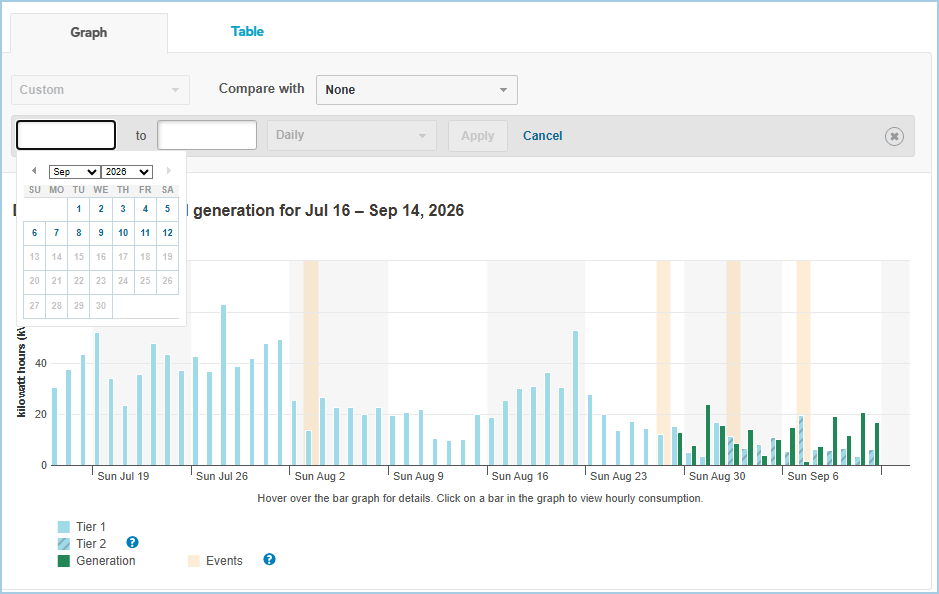
Real September example: APsystems had already supplied Sep 13, but BC Hydro was still only available through Sep 12. The combined report correctly stopped at Sep 12.
BC Hydro's own portal had Sep 13 and Sep 14 unavailable. SOLENKI was not missing data—the source had not published it yet.
Sync startedSOLENKI is checking the connected provider.
Sync OKThe connector completed successfully; the provider may still have no newer day available.
WEATHER
Use weather as context
Current conditions, forecasts, history and radar help explain why solar production changes. Weather does not replace measured APsystems production or BC Hydro meter data.
Example: A low-production day followed by a cloudy weather record is useful context. SOLENKI still uses the solar platform's measured kWh as the production value.
MESSAGES
Your SOLENKI inbox
The bell shows unread customer notices. Messages remain in history after they are marked read, so clearing the unread indicator does not delete the message.
RATES & BILLING
Why the rate matters
Purchase rates turn imported kWh into estimated cost. Export rates turn eligible exported kWh into generation-credit value. A BC Hydro billing cycle uses the exact start and end dates from the bill rather than a calendar month.
Tiered pricing: the Tier 1 allowance depends on the number of days in the billing period, which is why a saved billing cycle is useful for a like-for-like bill comparison.
BILLING CYCLE
Match the dates on your BC Hydro bill
Use a saved billing cycle when you want SOLENKI to report the same date span as the utility bill. Calendar month and billing cycle are not necessarily the same.
DATA COMPARISON
When SOLENKI compares utility data
Data comparison checks that SOLENKI's processed grid values remain consistent with the BC Hydro intervals already stored in the system. It is a consistency check, not a fresh download from MyHydro.
LOGIN & PRIVACY
Your provider credentials
Provider usernames/emails can be remembered on the device when you choose that option. Provider passwords are not stored in the SOLENKI database. When required providers are being connected, a failed provider password keeps the connection from being treated as successful.
ENVIRONMENT
Environmental impact
Environmental comparisons translate solar production into an estimated avoided-emissions scale. They are illustrative comparisons, not a statement that a literal number of trees was planted or saved.
HELP & SUPPORT
Your solar provider
For help with your SOLENKI service, use the solar-company contact information assigned to your customer profile.
Solar provider contact information will appear here after your profile is loaded.